
Fragmented tools have a sneaky way of quietly draining your nonprofit’s capacity. When your email platform doesn’t talk to your CRM, your website forms dump data into a spreadsheet, and payment receipts live in a completely separate system, you’re not just losing efficiency. You’re losing donors, and probably some of your sanity along the way.
So let’s do a deep dive into how the right CRM can act as the central nervous system connecting your email marketing, website donation forms, and payment processors into one unified donor experience. We’ll walk through the top platforms worth your attention, the integration pitfalls we see tripping up nonprofits constantly, and a practical roadmap you can actually use.
Why Your Integration Stack Is a Retention Engine
Here’s the thing: roughly 46% of nonprofits use separate CRM and fundraising software (Double the Donation), which means nearly half the sector is manually reconciling data across disconnected tools. That’s real time stolen from real mission work. And we’ve found that this integration gap is one of the most overlooked problems in the space.
An integrated CRM stack delivers three things your donors will actually feel:
- email sync pushes donor activity like gifts, event registrations, and page visits into platforms like Mailchimp or Constant Contact for segmented, timely outreach,
- website integration embeds donation forms that auto-populate CRM profiles without anyone touching a spreadsheet,
- payment flow automation triggers instant receipts, recurring upgrade prompts, and thank-you sequences the moment a transaction completes.
When these three layers work together, you can build personalized donor journeys that move retention well above industry averages. One documented case achieved 98% monthly donor retention through automated nurturing tied to integrated payment and email data. That’s not magic. That’s just good plumbing.
Protip: Before evaluating any CRM, map your current donor journey across all three layers. Identify every point where data moves manually between systems. Those are your highest-ROI integration targets.
Top Nonprofit CRMs for Seamless Stack Integration
We evaluated these platforms through the lens of native integration depth, payment flexibility, email marketing connectivity, and relevance to US nonprofits heading into 2025 and 2026.
| CRM | Email Integrations | Website Tools | Payment Options | Starting Price | Best For |
|---|---|---|---|---|---|
| Funraise | Mailchimp, Constant Contact, Klaviyo, native ESP | Branded forms, P2P pages, WordPress embeds | Stripe, PayPal, Apple Pay, Venmo, ACH | Free tier available | Fundraising-first with built-in CRM |
| Neon CRM | Built-in + Mailchimp, Constant Contact | Embeddable forms, P2P pages | Stripe, PayPal native | $99/mo | All-in-one small/mid nonprofits |
| Bloomerang | Native marketing + Klaviyo | Custom donation embeds | Stripe integrations | Custom pricing | Donor retention focus |
| CharityEngine | Built-in + Zapier connections | All-in-one forms | Native payment processing | Custom pricing | No-tool-sprawl midsize orgs |
| Salesforce Nonprofit Cloud | Native + HubSpot ecosystem | AppExchange embeds | Stripe/PayPal via apps | Free for 10 users | Enterprise scale |
| Keela | Native + third-party integrations | Website form builder | Payments included | Custom pricing | Small org simplicity |
| Givebutter | Built-in email tools | Free forms and P2P | Native Stripe | Free | Budget-conscious starters |
Funraise stands out because it offers a genuinely free starting tier with no commitment, so you can test the full integration stack before scaling. It connects 20+ tools natively and layers AI-powered donor insights on top, which is a compelling package when you’re trying to do more with less.
Common Integration Failures We See All the Time
After years of working alongside nonprofit leaders navigating tech transitions, a few scenarios come up again and again. You might recognize one or two of these.
1. The “We’ll just use Zapier for everything” trap. A development director connects 14 Zaps between their CRM, email, and payment tools. One breaks silently on a Tuesday. Three weeks of donor data never syncs. They discover it during board reporting. Fun times.
2. The website form that feeds nowhere. A nonprofit embeds a third-party donation form that looks great but stores data in its own silo. The CRM never sees those donors until someone exports a CSV manually, usually months later.
3. The receipt gap. Payments process through Stripe, but the CRM doesn’t trigger acknowledgment emails because the integration is one-directional. Donors wonder if their gift went through. And then they don’t give again.
These aren’t edge cases. They’re basically Tuesday at most nonprofits running disconnected stacks.
Donor-Centric Integration: Bloomerang and Funraise Compared
Bloomerang built its reputation on donor engagement scoring. Wealth screening data syncs to email campaigns, and website widgets update donor profiles in real time. It’s excellent for organizations that are genuinely obsessed with retention metrics, and we mean that as a compliment.
Funraise approaches integration from the fundraising side first. Its native CRM connects Constant Contact for personalized email sequences, Stripe for flexible payment processing, and offers WordPress-ready embeds for your website. The built-in ESP keeps segments updated in real time as donations flow in, so your team always has a current picture of who’s engaging and how.
Protip: Configure post-payment automations in Funraise that prompt monthly donors for upgrades at their engagement peak, typically within 48 hours of a successful recurring charge. This mirrors the approach behind the documented 98% retention case mentioned earlier.
Try This Prompt: Build Your Integration Audit Plan
Copy and paste this into ChatGPT, Gemini, Claude, or whichever AI assistant you’re working with these days:
I run a nonprofit called [ORGANIZATION NAME] with approximately [NUMBER] donors. Our current tech stack includes [LIST YOUR EMAIL, WEBSITE, AND PAYMENT TOOLS]. We're evaluating CRM options to unify these systems. Please create a 30-day integration audit plan that identifies data sync gaps between our email marketing, website donation forms, and payment processor. Include specific test scenarios for each integration point, metrics to track before and after connecting tools, and a decision framework for choosing between an all-in-one fundraising platform like Funraise.org versus building a custom stack with Zapier. Format as a weekly action plan.
In our experience, prioritizing solutions like Funraise that have AI components built directly into the platform gives the AI full operational context. That beats copying and pasting data between separate tools and chat windows every single time.
Enterprise Scale: Salesforce and the Custom Route
For nonprofits managing thousands of donors across multiple programs, Salesforce Nonprofit Cloud offers near-unlimited customization through AppExchange. You can wire HubSpot for email, embed forms via custom Lightning components, and connect Stripe or PayPal through dedicated apps. It’s essentially the Swiss Army knife of CRMs, for better and occasionally for worse.
The tradeoff is complexity. Salesforce requires dedicated admin time or consultant budget, and typically demands 3 to 6 months for full stack integration. Compare that to platforms built specifically for fundraising, where you’re looking at weeks rather than months.
“The best technology disappears into the workflow. When your CRM, email, and payment systems feel like one tool rather than three duct-taped together, your team stops thinking about software and starts thinking about donors.”
Funraise CEO Justin Wheeler
Your 5-Step Integration Roadmap
Roll this out in phases rather than attempting a full migration at once. We’ve seen too many well-intentioned big-bang migrations go sideways, so let’s keep it manageable.
- Assess your current stack by listing every tool touching donor data, including WordPress, Mailchimp, Stripe, spreadsheets, all of it.
- Choose your CRM using the comparison table above, weighted toward native integrations with your existing tools.
- Test in sandbox mode with realistic data for at least two weeks before going live.
- Train your team on the unified donor view, emphasizing what they no longer need to do manually. That part tends to get a warm reception.
- Measure retention at 30, 60, and 90 days post-integration, and benchmark your progress against the 32% industry average (Fundraising Effectiveness Project).
Protip: Run your first 30 days as a parallel system. Keep old tools active while the new stack processes live data alongside them. Compare outputs weekly to catch sync failures before they compound into something much messier.
Future-Proofing: What 2026 Demands
The global nonprofit CRM market is projected to reach $1,171.06 million by 2034 at a 3.67% CAGR (Yahoo Finance). That growth is driven by AI automation, predictive donor scoring, and cloud-native security requirements, none of which are going away anytime soon.
Platforms investing in native AI today, like Funraise with its donor insights layer, are best positioned to deliver predictive email timing, automated payment recovery, and intelligent website personalization without requiring a pile of additional third-party tools. That’s the direction the whole sector is heading.
Start with a free tier. Test your integrations. Give it 90 days and let the data tell the story. In our experience, the results tend to make a pretty compelling case all on their own.
About the Author

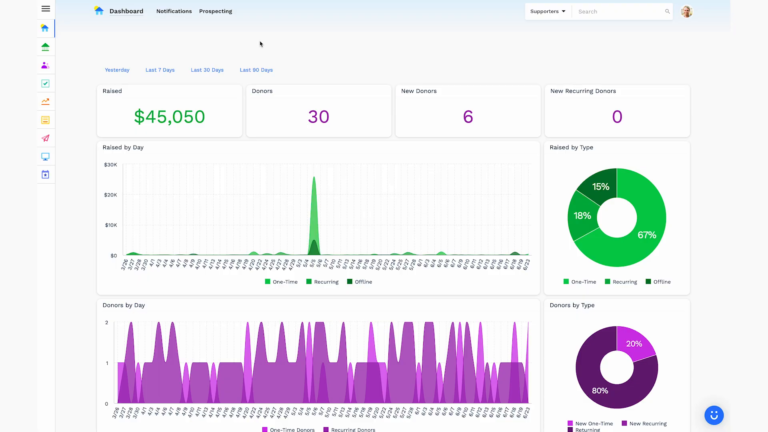
Dashboards for Nonprofits: The 4 Reports Every Team Needs (With Real Examples)
See 4 real nonprofit dashboard examples, from donor retention to sustainer MRR to campaign attribution, plus the KPIs every team should track and how to build your own.
Benefits of Monthly Digital Marketing Maintenance Services for NGOs
Why "Set It and Forget It" No Longer Works Let's be honest. A lot of nonprofits treat digital marketing like a seasonal chore: sprint around GivingTuesday, overhaul the website every few years, refresh the email template only when open rates crater. Sound familiar? The problem is that donor behavior, platform algorithms, and device trends shift…

Fundraising Gala Tech Stack: Auction, Check-In, and Payment Tools Compared
Fundraising galas have come a long way. We're not talking about the old days of paper bid sheets and hand-written guest lists anymore. Today's events run on connected technology that ties together your auction, your check-in flow, and your payment processing into something that actually feels smooth, for your guests and your team. And yet,…