
Your nonprofit’s website is doing more work than you might realize. It’s quietly (or not so quietly) representing your mission to donors who’ve never met you, volunteers who are still on the fence, and community members trying to understand what you’re actually about. And in 2026, that digital first impression carries more weight than ever, especially as donor expectations shift and competition for attention keeps climbing.
So we figured we’d put together a practical, no-fluff website management checklist you can actually use. We’re talking strategy, design, accessibility, content, SEO, technical upkeep, and fundraising optimization, all mapped out so you know what to do, when to do it, and why it matters for your mission.
Strategy and Planning: Start Before You Touch Code
Too many nonprofits jump straight into redesigns without aligning their website to measurable mission goals. That’s how you end up with a gorgeous site that converts nobody.
Three approaches we’ve found make a real difference:
- Goal-to-KPI mapping. Define what your site must accomplish (donations, sign-ups, awareness) and attach specific KPIs to each goal. Industry average donation conversion sits at roughly 1.5% of visitors (slammedialab.com), so know your baseline before setting targets.
- User persona journey mapping. Build profiles for donors, volunteers, and beneficiaries. Map the full path from awareness (a blog post, a social link) to conversion (donation form, volunteer application). This prevents the classic mistake of designing for your board instead of your actual audience.
- Budget as a program line item. Allocate 15-20% of your tech budget to ongoing website maintenance. Treat your site as a living program, not a one-time project you hand off and forget about.
Protip: Run a quarterly debrief after major campaigns to review analytics and adjust your approach. Organizations that build this “debrief culture” consistently outperform those that launch and hope for the best.
Design and User Experience
Slow or clunky sites cost you real money. Desktop still drives 70% of online revenue despite representing only 55% of transactions (charitydesign.co), which means both desktop and mobile experiences need to be on point.
| Element | 2026 Best Practice | Quick Win | Metric to Track |
|---|---|---|---|
| Navigation | Simple menus, 1-click access to donate/volunteer | Limit to 7 top-level items | Bounce rate below 40% |
| Mobile | Mobile-first design; 50%+ traffic is mobile | Test with Google Mobile-Friendly Tool | Mobile conversion rate |
| Visual storytelling | Hero images, impact videos, dynamic content | Add short mission video to homepage | Time on page above 2 min |
| CTAs | Bold “Donate Now” buttons on every page; recurring options prominent | A/B test button colors and copy | CTA click-through 5-10% |
Also, maintain branding consistency across every page: logo, colors, typography. Disjointed visuals erode trust faster than you’d expect.
Accessibility: Not Optional in 2026
WCAG compliance is the baseline, not the finish line. If your forms aren’t keyboard-navigable, your images lack alt text, or your color contrast fails AA standards, you’re actively excluding supporters and exposing your organization to unnecessary risk.
Your monthly accessibility punch list:
- alt text and captions on every image, no exceptions,
- color contrast meeting AA ratios, with a minimum 16px font size,
- semantic HTML and ARIA labels on all forms for screen reader compatibility,
- language toggles if you serve multilingual communities.
Funraise data shows that optimized, accessible forms can boost conversions by 78% (slammedialab.com). That alone makes the effort worthwhile.
Free tools like WAVE or Google Lighthouse let you run instant audits. Fix the top 10 errors each month and you’ll prevent the slow bleed of donor drop-off that comes from frustrated users hitting dead ends.
Content Management: Map Content to the Donor Journey
Fresh, SEO-optimized content converts visitors into advocates. But random blog posts published whenever someone has a spare hour don’t count as a strategy.
Structure your content by journey stage. Your homepage needs a prominent mission statement with concrete impact stats. Your blog should target cause-specific keywords and link internally to donation pages. Group stories, videos, and infographics into multimedia hubs organized by program area.
One 2026-specific move worth testing: embed an AI chatbot that offers personalized content recommendations, matching a visitor’s expressed interests to relevant volunteer opportunities or giving paths. This isn’t science fiction anymore. It’s quickly becoming table stakes for organizations competing for attention. Nonprofits raise $1.29 per website visitor on average (charitydesign.co), and a strong content strategy can push that number noticeably higher.
Copy this prompt into ChatGPT, Gemini, Claude, Perplexity, or whichever AI tool you use daily:
Act as a nonprofit digital strategist. I manage the website for [NONPROFIT NAME], a [MISSION AREA] organization based in [LOCATION]. Our primary website goals are [LIST 2-3 GOALS, e.g., increase recurring donations, grow volunteer sign-ups, improve SEO visibility]. Audit our current approach and generate a prioritized 90-day website optimization checklist with specific, measurable action items for each goal.This gets you a tailored starting point in minutes. That said, for your day-to-day fundraising work, look into platforms like Funraise that have AI capabilities built directly into the tools where you execute tasks, giving you full operational context instead of copying between tabs.
What We See Go Wrong (Constantly)
Working alongside nonprofit leaders every day at Funraise, we’ve noticed certain patterns showing up again and again before organizations get their website management under control:
- the “set it and forget it” donation form. An organization launches a beautifully designed giving page, then never tests it again. Six months later, a plugin update breaks the mobile layout and nobody notices until a board member tries to donate from their phone. Monthly form testing isn’t paranoia. It’s basic hygiene,
- analytics installed but never read. Google Analytics 4 is connected, the dashboard exists, but no one on staff actually reviews the data or knows what to look for. The result: decisions made on gut feeling while conversion data sits untouched,
- the CRM-website disconnect. Donor data lives in one system, the website in another, email in a third. Every interaction creates a manual reconciliation task. This is the single most common source of wasted staff hours we see across organizations of all sizes.
If any of these sound familiar, you’re not alone. And you don’t need a massive budget to fix them. Funraise offers a free tier that lets you start consolidating your fundraising tools with zero commitment.
Fundraising Optimization
Every page on your site should function as a potential fundraising touchpoint. That’s not an overstatement, it’s just how donor behavior actually works.
Reduce form friction ruthlessly: one-click, mobile-optimized donation forms with recurring giving pre-selected. Use exit-intent popups to capture email subscriptions or prompt a gift before a visitor bounces. And highlight tangible impact, because “Every $10/month feeds a child” outperforms generic asks every single time.
Funraise users grow recurring revenue 52% year-over-year (charitydesign.co), and their average monthly recurring gift reaches $40 compared to the industry average of $21 (slammedialab.com). The difference isn’t magic. It’s intentional form optimization and a recurring-first design philosophy. Worth noting: Action Against Hunger achieved a 78% conversion lift simply by embedding optimized forms on-site (slammedialab.com). A/B testing your popup forms really does pay off.
SEO and Discoverability
SEO drives a meaningful share of donor discovery, so it’s worth doing intentionally. Focus on cause-specific and location-based keywords. Keep title tags under 60 characters. Implement schema markup for events and donations, and claim your Google Business Profile if you haven’t already.
In our experience, the biggest SEO gains come from combining three tactics at once: consistent blogging on cause keywords, strategic backlink outreach to partner organizations, and social sharing that drives referral traffic. Isolated efforts tend to underperform. It’s the compound effect of all three working together that actually moves rankings.
“The nonprofits that win online in 2026 are the ones that stop treating their website like a digital pamphlet and start treating it like their most important staff member, one that works 24/7, never calls in sick, and talks to every single person who walks through the door.”
Funraise CEO Justin Wheeler
Technical Performance, Security, and Integrations
Speed target: under 3 seconds load time. Compress images, enable caching, and choose scalable hosting. Enforce HTTPS everywhere. Schedule bi-weekly backups and plugin updates to prevent the kind of security breaches that make for very awkward board meetings.
On integrations: sync your CRM, email, and website into a unified data layer. Funraise’s Salesforce integration is a solid example of what eliminating data silos actually looks like in practice. As your capacity grows, layer in SMS, social feeds, and mobile wallet options. And if you’re not using automated backups yet, a tool like UpdraftPlus is a good place to start. It prevents the vast majority of catastrophic data loss scenarios (kanopi.com) and takes about fifteen minutes to set up.
Your 12-Week Launch and Maintenance Roadmap
| Phase | Timeline | Focus |
|---|---|---|
| Audit and strategy | Weeks 1-2 | Analytics review, persona mapping, goal setting |
| Design, develop, optimize | Weeks 3-8 | UX overhaul, form optimization, content creation |
| Test, launch, train | Weeks 9-12 | User testing, staff training, soft launch |
| Ongoing | Monthly | Update plugins, review analytics, A/B test, gather feedback |
The organizations that follow a structured cadence like this don’t just launch better websites. They maintain them. And maintenance is honestly where the real compounding returns live, which is something that’s easy to overlook when you’re in launch mode.
If you’re looking for a platform that consolidates donation forms, CRM sync, and fundraising analytics into one place, it’s worth giving Funraise a look. The free tier lets you start immediately with no commitment, so you can test the waters before going all in.
About the Author

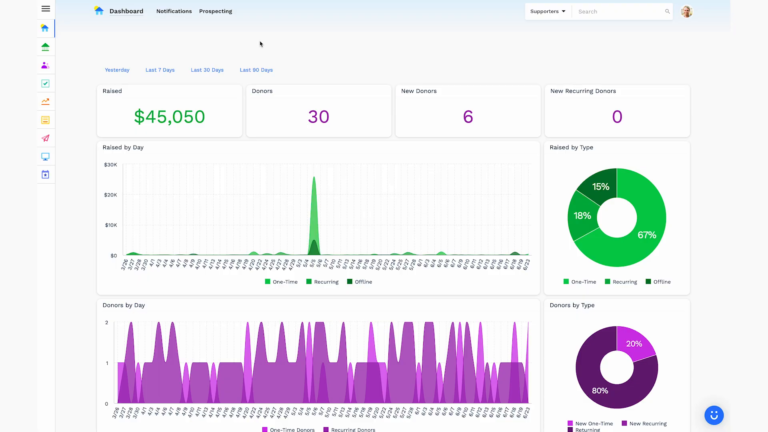
Dashboards for Nonprofits: The 4 Reports Every Team Needs (With Real Examples)
See 4 real nonprofit dashboard examples, from donor retention to sustainer MRR to campaign attribution, plus the KPIs every team should track and how to build your own.

Benefits of Monthly Digital Marketing Maintenance Services for NGOs
Why "Set It and Forget It" No Longer Works Let's be honest. A lot of nonprofits treat digital marketing like a seasonal chore: sprint around GivingTuesday, overhaul the website every few years, refresh the email template only when open rates crater. Sound familiar? The problem is that donor behavior, platform algorithms, and device trends shift…

Fundraising Gala Tech Stack: Auction, Check-In, and Payment Tools Compared
Fundraising galas have come a long way. We're not talking about the old days of paper bid sheets and hand-written guest lists anymore. Today's events run on connected technology that ties together your auction, your check-in flow, and your payment processing into something that actually feels smooth, for your guests and your team. And yet,…