
Somewhere between “we’ll just export that later” and a Monday morning spent untangling spreadsheets, a lot of nonprofits quietly lose donors they never meant to let go. Not because they don’t care, but because their tools aren’t talking to each other. And when your systems work in silos, the moments that matter, like a first-time donor waiting on a thank-you, or a lapsed supporter ripe for re-engagement, just slip through the cracks.
So that’s what we’re digging into here. Think of it as a practical tour through what a truly connected fundraising tech stack looks like in 2026, from your CRM and payment processor to email, analytics, accounting, and everything in between. We’ll walk through what each layer does, what to look for, and how the whole thing works better when it actually communicates.
Why Integration Is Non-Negotiable Now
Three forces are converging in 2026 that make fragmented tools a genuine liability:
- digital-first fundraising is core infrastructure, not a nice-to-have. Donors expect seamless experiences, from one-click checkouts to mobile-optimized forms (nfcb.org),
- email still drives action. 33% of donors say email inspires their giving most (nptechforgood.com). But only if the email knows what the donor already did,
- AI has shifted from innovation to infrastructure. It now automates personalization at scale, but only when it has clean, connected data to work with (nfcb.org).
When your donation processor can’t tell your CRM what just happened, you lose the moment. When your email tool can’t see donor history, you send generic appeals to your most loyal supporters. Every disconnected tool is a missed conversation with a donor.
Protip: If you’re not ready for a full stack overhaul, start with Zapier webhooks as a “universal translator” between legacy tools. It bridges gaps without requiring full replacements (funraise.org/integrations).
The CRM Is Your Hub: Choose Wisely
Everything radiates from your nonprofit CRM. It should sync donors, donations, and communications automatically, with no manual CSV exports and no copy-paste workflows.
| CRM | Key Strength | Notable Integrations | Pricing |
|---|---|---|---|
| Funraise | AI dashboards, 73% YoY revenue growth | Stripe, Mailchimp, QuickBooks, PayPal | Starts free, scales with revenue |
| Bloomerang | Donor retention focus | QuickBooks, Mailchimp, Stripe | $119/mo base |
| DonorPerfect | All-in-one campaign tools | PayPal, Classy, Eventbrite | Custom, mid-market |
| Salesforce Nonprofit Cloud | Enterprise scale | Extensive via AppExchange | High cost, grant-eligible |
The real question here isn’t which CRM has the longest feature list. It’s which one actually pushes and pulls data in real time with the rest of your tools. Funraise, for example, pushes transaction data from Stripe or PayPal directly into the CRM the moment a gift comes in, with no export step required (funraise.org/integrations).
Payment Processing: Where Friction Kills Conversion
Stripe and PayPal dominate nonprofit payments for good reason. They handle cards, ACH, Apple Pay, Venmo, and even crypto via BitPay, and they auto-sync to CRMs for real-time acknowledgment (donorperfect.com, funraise.org/integrations). Here’s a quick breakdown of your options:
- Stripe: nonprofit rate of 2.2% + 30¢, global reach, optimized for recurring gifts,
- PayPal: high trust factor, Venmo in-app giving, embeddable buttons,
- Zeffy: zero-fee model, but limited at scale.
Protip: Enable “donors cover fees” toggles on your donation forms. This one small feature can boost net revenue by 5-10% without any extra asks from your team.
Common Failures We See Every Day
Before nonprofits find an integrated approach, and honestly sometimes even after, certain patterns repeat so consistently they’re almost universal. Sound familiar?
- the “We’ll just export it” trap. A development director spends six hours every Monday manually reconciling donation data between their payment processor and CRM. By the time it’s clean, the window for timely thank-you emails has already closed. First-time donors never hear back quickly enough,
- the segmentation that never happens. An organization has 14,000 email subscribers but blasts every appeal to the full list because their email tool has zero visibility into giving history. Open rates crater. Major donors get the same $25 ask as first-time visitors,
- the “phantom donor” problem. P2P campaign donations come in through Facebook, but without a native sync, those donors never enter the CRM. The nonprofit literally cannot follow up with people who already gave.
These aren’t edge cases. They’re Tuesday.
Email, SMS, and the Personalization Layer
Since 33% of donors cite email as their top giving inspiration and 76% of nonprofits send appeals at least quarterly (nptechforgood.com), your outreach tools need full CRM context to do their job well. Three approaches that work when systems are actually connected:
Behavioral triggers let your CRM flag lapsed donors automatically and fire a re-engagement sequence through Mailchimp or Constant Contact. SMS campaigns deliver strong response rates for urgent appeals, with tools like RallyUp bundling text right into the workflow. And AI-drafted content, like Funraise’s AppealAI, generates resonant appeals based on real donor data rather than guesswork.
Try This Prompt in Your Favorite AI Tool
Copy and paste the prompt below into ChatGPT, Gemini, Claude, Perplexity, or whichever AI assistant you use daily:
I run a nonprofit focused on [MISSION AREA] with approximately [NUMBER OF DONORS] active donors. Our current tech stack includes [LIST CURRENT TOOLS, e.g., Mailchimp, QuickBooks, spreadsheets]. Our biggest operational bottleneck is [DESCRIBE BOTTLENECK, e.g., manual data entry between donations and CRM]. Map out a 2026 integrated tech stack where every tool syncs automatically. For each recommended layer (CRM, payments, email, analytics, accounting), explain what data should flow between systems and suggest specific integration methods (native API, Zapier, or webhook). Include how an all-in-one fundraising platform like Funraise.org could consolidate multiple layers and reduce integration points.In your daily work, it’s worth prioritizing solutions like Funraise that have AI components built directly into the workflow, giving you full operational context right where tasks happen, rather than making you jump between disconnected tools.
Analytics and AI: The Intelligence Layer
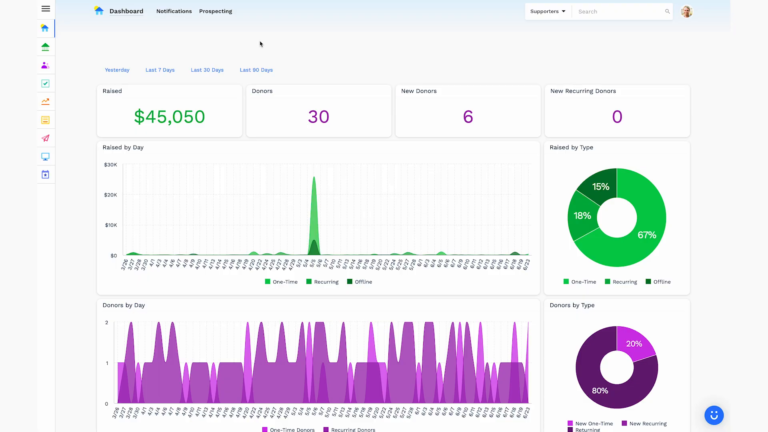
Dashboards only matter if they’re pulling from every system at once. Funraise’s Fundraising Intelligence feature, for example, has been shown to boost retention by 12% by surfacing actionable patterns across donor behavior (funraise.org). Here’s how analytics maturity tends to progress:
| Maturity Level | Typical Tools | What You Actually Learn |
|---|---|---|
| Basic | Google Analytics | Website traffic, nothing about donors |
| Mid-tier | CRM native reports | Donor trends, gift frequency |
| Advanced | Funraise AI + Zapier pipelines | Predictive LTV, automated segmentation, channel ROI |
The jump from mid-tier to advanced is where things get genuinely exciting. Predictive AI can forecast donor lifetime value, segment proactively before lapse occurs, and A/B test donation forms on its own. That’s not just efficiency. That’s a fundamentally different way of operating.
Protip: Set “retention alerts” in your dashboard that notify your team when a donor’s engagement score dips below a threshold. That trigger should automatically queue personalized outreach, not just flag a report nobody checks.
“The nonprofits that win in 2026 won’t be the ones with the most tools. They’ll be the ones whose tools actually share context, so every donor interaction builds on the last one instead of starting from scratch.”
Funraise CEO Justin Wheeler
P2P, Events, and the Reach Multipliers
Peer-to-peer fundraising and events extend your donor base well beyond your own lists, but only if the data flows back. Funraise and Givebutter both sync P2P supporter data into the CRM, so you can actually follow up with those new donors (funraise.org/integrations). Also worth exploring: Twitch and Streamlabs for youth-focused causes where gamers donate during live streams and that data auto-imports for follow-up. Plus, matching gift tools like Double the Donation embed directly into donation forms, automatically checking employer eligibility and potentially doubling revenue without any extra effort from the donor (funraise.org/integrations).
Accounting: Closing the Loop
QuickBooks Online syncs donations automatically when connected to your CRM, reconciling fees and generating receipts without manual bookkeeping (funraise.org/integrations). Newer revenue channels like donor-advised funds via DAFpay and stock donations via DonateStock also plug into this ecosystem, diversifying income without piling on manual processes.
With 1.8 million nonprofits in the US competing for donor attention (nptechforgood.com), the organizations that retain supporters will be the ones whose tech stack operates as a single, connected system rather than a collection of isolated tools doing their own thing.
Where to Start
You don’t need to rebuild everything at once. Start with the hub. If your CRM can’t auto-sync with your payment processor and email tool today, that’s your first fix. Funraise offers a free tier with no commitments, so you can test whether a truly integrated stack changes your workflow before making any bigger decisions.
The best tech stack in 2026 isn’t the most expensive one. It’s the one that actually talks to itself.
About the Author

Dashboards for Nonprofits: The 4 Reports Every Team Needs (With Real Examples)
See 4 real nonprofit dashboard examples, from donor retention to sustainer MRR to campaign attribution, plus the KPIs every team should track and how to build your own.

Benefits of Monthly Digital Marketing Maintenance Services for NGOs
Why "Set It and Forget It" No Longer Works Let's be honest. A lot of nonprofits treat digital marketing like a seasonal chore: sprint around GivingTuesday, overhaul the website every few years, refresh the email template only when open rates crater. Sound familiar? The problem is that donor behavior, platform algorithms, and device trends shift…

Fundraising Gala Tech Stack: Auction, Check-In, and Payment Tools Compared
Fundraising galas have come a long way. We're not talking about the old days of paper bid sheets and hand-written guest lists anymore. Today's events run on connected technology that ties together your auction, your check-in flow, and your payment processing into something that actually feels smooth, for your guests and your team. And yet,…