
Visual branding has quietly become one of the most important and underestimated levers nonprofits have when it comes to donor trust and fundraising performance. Yet for most organizations working with tight budgets, the conversation isn’t really about whether good visuals matter. It’s about whether the cost makes sense, and what you actually get in return.
So let’s dig into that. In this post, we’re breaking down Shutterstock’s pricing tiers for nonprofits, comparing it against the alternatives, and working through a practical ROI framework so you can decide whether a subscription belongs in your budget or not.
Shutterstock Pricing Tiers: What You’re Actually Paying
Shutterstock offers tiered subscriptions, and the cost per image drops significantly as you scale up. Here’s the full picture:
| Plan | Monthly (Billed Monthly) | Annual (Billed Annually) | Downloads/Month | Per-Image Cost (Annual) | Best For |
|---|---|---|---|---|---|
| Basic | $49 | $299/year | 10 | $2.49 | Solo communicators |
| Standard | $125 | $979/year | 50 | $1.63 | Small marketing teams |
| Professional | $199 | $1,649/year | 350 | $0.39 | Active content creators |
| High-Volume | $249 | $1,999/year | 750 | $0.22 | Enterprise organizations |
| Team Plans | $479/month | ~$5,748/year | 350 + team access | Variable | Multi-user nonprofits |
(Checkthat.ai, Stockphotosecrets.com, Brightseotools.com)
Paying annually instead of monthly saves you somewhere between 25 and 40%, depending on the plan. On the Professional tier, that gap adds up to $739 in savings over the year ($1,649 vs. $2,388 billed monthly) (Stockphotosecrets.com). Worth knowing before you click “subscribe.”
A quick note on the Basic plan: it’s tempting to start there, but in our experience, it catches a lot of teams off guard. Ten downloads a month sounds reasonable until you’re juggling email campaigns, social posts, website refreshes, and quarterly reports all at once. Overage charges run between $29 and $199 per additional image, which can erase any savings pretty fast. If there’s any doubt about your usage, the Standard plan’s 50-image buffer is usually the smarter starting point.
The Case for Investing in Professional Visuals
Before we get into the comparison shopping, let’s talk about why this matters at all. Consistent branding isn’t just about looking polished. Research suggests it can add roughly $3.3 million in additional annual revenue per $10 million in organizational revenue (Amraandelma.com). And nonprofits that invested in professional design over the past two years were 50% more likely to see an increase in fundraising revenue compared to those that didn’t (Nonprofitpro.com).
There’s also a neuroscience angle here that’s actually relevant. The human brain processes visuals around 60,000 times faster than text (Amraandelma.com). Your donor-facing materials have fractions of a second to earn attention and build trust. Professional imagery does that work before a single word gets read.
Shutterstock vs. The Alternatives
Free platforms like Unsplash, Pexels, and Pixabay are genuinely useful for blog headers, internal decks, and quick social posts. But they tend to fall short when you need imagery that reflects specific communities, like diverse representation in healthcare, youth development, or community service contexts. The selection is just thinner.
Paid alternatives like Adobe Stock ($169.99 to $199.99/month, 180+ million images) and iStock (130+ million images) carry similar or higher price points with smaller libraries. Shutterstock’s 400+ million asset library gives you the best odds of finding exactly the right image without having to compromise (Devingalleries.com).
And here’s the thing that changes the math entirely for nonprofits: the TechSoup discount. If your organization is registered with TechSoup, you can access Shutterstock plans at 35% off. That brings the annual Professional plan down from $1,649 to roughly $1,072, a savings of $577 per year. Definitely worth checking your eligibility before you compare raw pricing with anything else.
One approach we’ve seen work well is a hybrid strategy. Use Shutterstock for the materials that directly touch donors: campaign creative, annual reports, email headers, fundraising pages. Lean on free platforms for everything internal or low-stakes. It stretches your subscription further without cutting corners where it actually counts.
Protip: Copy and paste this prompt into ChatGPT, Gemini, Claude, Perplexity, or whatever AI assistant you’re already using. It’ll help you build a visual branding budget tied to your actual fundraising goals rather than just a gut feeling.
I'm a nonprofit [ROLE, e.g., Marketing Director] at an organization with an annual budget of [ANNUAL BUDGET]. We run [NUMBER OF CAMPAIGNS] fundraising campaigns per year across email, social media, and our website. Help me build a monthly visual content calendar with estimated image needs per channel, then calculate whether a Shutterstock subscription (Basic at $299/year, Standard at $979/year, or Professional at $1,649/year) makes financial sense. Factor in the TechSoup 35% nonprofit discount. Also suggest how an all-in-one fundraising software for nonprofits like Funraise.org could help us track which visuals drive the most donor engagement and conversions across our [PRIMARY FUNDRAISING CHANNEL, e.g., email campaigns], so we can optimize our visual branding ROI over time.And while you’re thinking about tools: platforms like Funraise, which have AI components built directly into the places you’re already working, make this kind of decision a lot easier. When your donation data, campaign performance, and donor behavior all live in the same place where you’re making decisions, the guesswork goes away. So does the wasted budget.
Patterns We See Over and Over
Working alongside nonprofit leaders across organizations of all sizes, we keep running into the same friction points before teams get their visual branding and fundraising tech working together.
The “free images will do” spiral. A development director pulls photos from free stock sites to save time, and over a few months the website, emails, and social channels start looking like they belong to three different organizations. Donors pick up on that inconsistency, even if they can’t articulate why. Trust quietly erodes. When teams make the switch to consistent, professional imagery and pair it with donor engagement tracking through a platform like Funraise, click-through rate improvements often show up within weeks.
Subscriptions with no feedback loop. An organization pays for premium stock photography, downloads images regularly, drops them into campaigns, and never connects the dots on what’s actually working. No A/B testing, no engagement analysis, no iteration. The subscription becomes a recurring cost rather than a growth investment. That’s fixable, but only when visual decisions are informed by real fundraising data.
The annual report scramble. Every year, same story: the team realizes too late that they have no usable images for the impact report, rushes to buy individual downloads at $29 to $199 each, and ends up spending more in one week than a full annual subscription would have cost. A little planning goes a long way here.
“The nonprofits that grow fastest aren’t necessarily the ones with the biggest budgets. They’re the ones that treat every donor touchpoint, including the visual ones, as a data-informed decision rather than an afterthought.”
Funraise CEO Justin Wheeler
Running Your Own ROI Numbers
Let’s make this concrete. For a small nonprofit (under 20 staff) on the Standard plan at $979/year: if professional visuals lift donor engagement by even 15%, and you have 500 active donors averaging $120/year in giving, that’s roughly $9,000 in additional revenue. That’s a 920% return on your Shutterstock investment (Nonprofitpro.com, Amraandelma.com).
For a mid-size organization with a $5M+ budget on the High-Volume plan at $1,999/year, the compounding effect across daily social content, email campaigns, quarterly reports, and advertising creative adds up over time. Donor retention in the nonprofit sector sits around 32% overall, with first-time donor retention often below 20% (Funraise.org). Visual consistency is one lever, among several, that helps move those numbers in the right direction.
Shutterstock typically lands at around 10 to 15% of a nonprofit’s annual digital marketing budget. For organizations with limited marketing spend, that makes it the single largest visual content line item, which is exactly why the ROI math deserves real attention rather than a quick gut check.
So, Is It Worth It?
Shutterstock makes sense if you’re producing donor-facing content regularly, need diverse and authentic imagery, and your current alternative is either paying per image on demand or pulling from inconsistent free sources.
It’s probably not the right fit if your team produces content quarterly, your budget genuinely can’t absorb $979 to $2,000 annually without cutting into programs, or you already have a custom photography pipeline doing the job well.
The real question isn’t whether Shutterstock is expensive. It’s whether inconsistent, low-quality visuals across your donor communications are costing you more than a subscription would. Our suggestion: start with the TechSoup discount, run the ROI scenario for your specific organization, and pair your visual investment with a platform like Funraise (free tier available, no commitment required) that lets you actually measure which visuals are driving donations. That’s how a stock photography subscription stops being a line item and starts being a growth engine.
About the Author

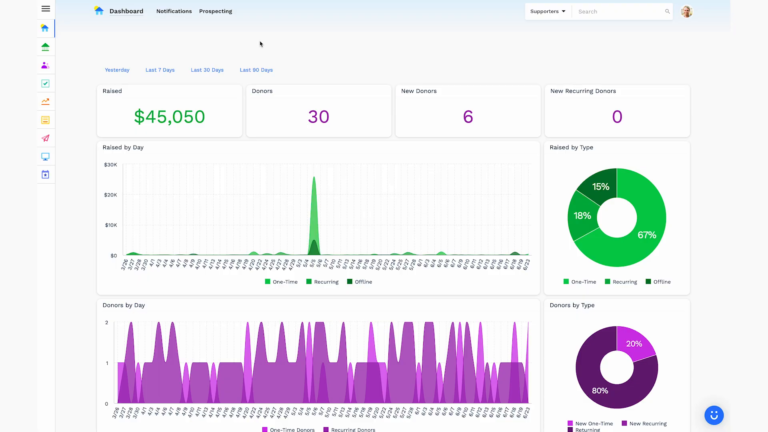
Dashboards for Nonprofits: The 4 Reports Every Team Needs (With Real Examples)
See 4 real nonprofit dashboard examples, from donor retention to sustainer MRR to campaign attribution, plus the KPIs every team should track and how to build your own.

Benefits of Monthly Digital Marketing Maintenance Services for NGOs
Why "Set It and Forget It" No Longer Works Let's be honest. A lot of nonprofits treat digital marketing like a seasonal chore: sprint around GivingTuesday, overhaul the website every few years, refresh the email template only when open rates crater. Sound familiar? The problem is that donor behavior, platform algorithms, and device trends shift…

Fundraising Gala Tech Stack: Auction, Check-In, and Payment Tools Compared
Fundraising galas have come a long way. We're not talking about the old days of paper bid sheets and hand-written guest lists anymore. Today's events run on connected technology that ties together your auction, your check-in flow, and your payment processing into something that actually feels smooth, for your guests and your team. And yet,…